Hey friend!
Your communications director has spent the last year teaching ChatGPT how your church talks.
She built a custom assistant that writes the weekly email in your voice. She saved instructions for your brand colors, your service times, and the way you describe your kids ministry. She has 14 months of chat history full of series promos, event announcements, and volunteer recruiting copy.
All of it lives in her personal account. She pays for it with her own credit card.
The day she takes a job at another church, all of that goes with her.
Today I'll show you how to find out where your church's AI work lives, and what to do about it before your next staff change.
Let's dive in.
I'm willing to bet some of your team is already using their own AI accounts for church work.
This is so common it has a name: bring your own AI, or BYOAI.
Microsoft and LinkedIn surveyed 31,000 people in 31 countries for their 2024 Work Trend Index. They found that 78% of AI users bring their own AI tools to work.
That study covered workers in general. Church staff fit the pattern. Most churches never bought AI tools for their team, so staff went and got their own.
Here's what that usually looks like at a church:
- A personal ChatGPT or Claude subscription, sometimes reimbursed and sometimes not.
- A free account signed up with a personal Gmail address.
- A tool a volunteer found and shared with the team.
- A church credit card paying for an account tied to one person's email.
Your team found tools that help them serve faster, and that's a good thing.
The trouble is ownership.
The church's work lives in accounts the church can't open.
Think about what builds up in an AI account after a year of daily use.
- Chat history with drafts of every email, post, and announcement.
- Custom assistants set up with your church's voice and details.
- Saved instructions and memory that know your ministries, your staff names, and your style.
- Files uploaded along the way, like your brand guide, your volunteer handbook, or last year's budget.
OpenAI's own help center is clear about who that content belongs to. It recommends that employees keep personal accounts tied to a personal email address, so they keep access to their own content no matter where they work.
So the account belongs to the person. The church has no login and no copy.
A resignation is when you find out what you lost.
Here's how it plays out.
A staff member gives 2 weeks notice. You collect the building keys and the laptop. You change the password on the church Facebook page.
Nobody asks about the AI account, because nobody knew it mattered.
3 weeks later, your new hire asks where the email templates are. The custom assistant that wrote the weekly email is gone. The saved instructions are gone. The history of what worked is gone.
There's a second problem. If any prayer requests, pastoral care notes, or donor details went into that account, they now sit with a former employee. You have no way to see that information or delete it.
Run a 20-minute AI inventory with each staff member this month.
The fix starts with a simple list.
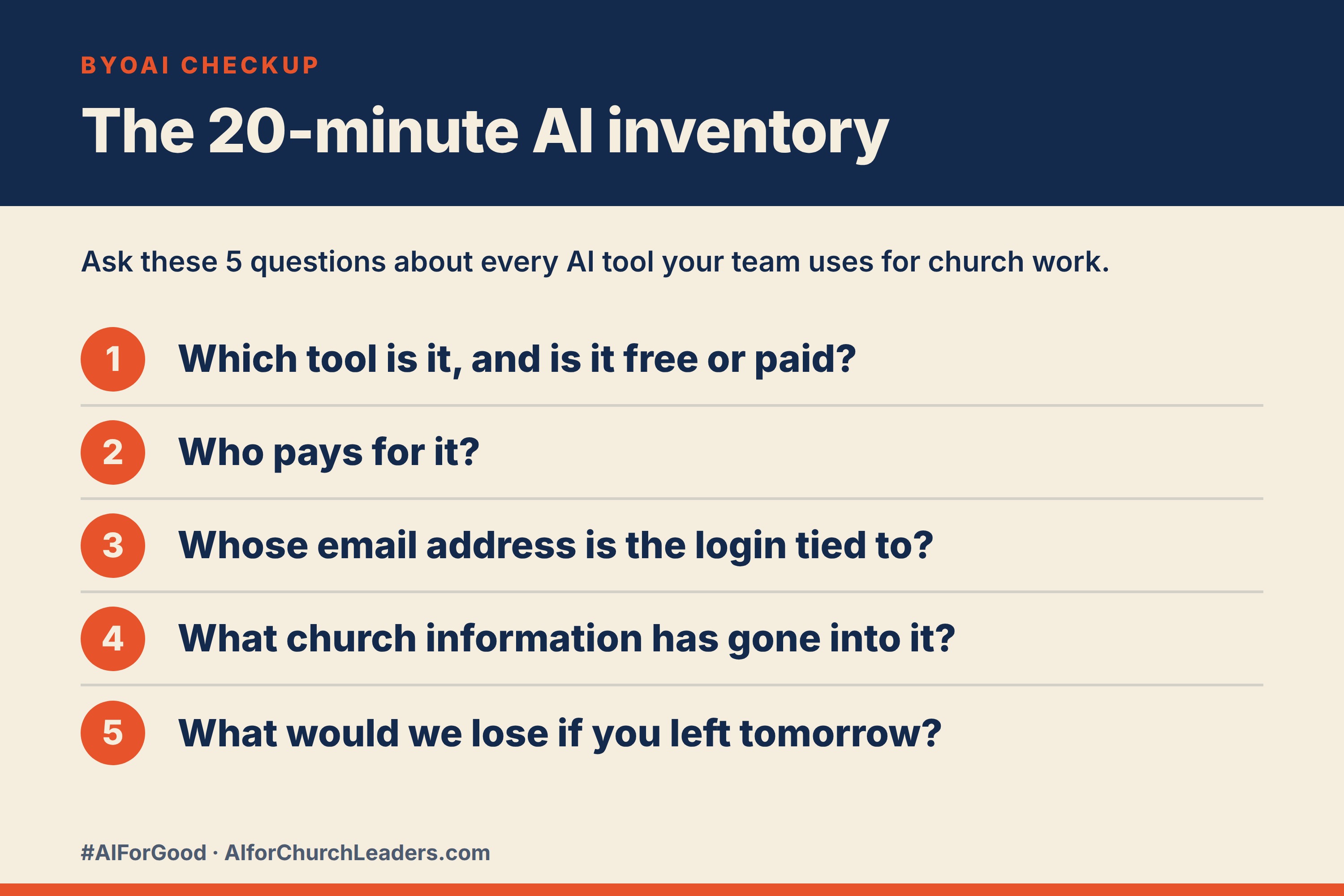
Sit down with each staff member, or send a short form, and ask 5 questions about every AI tool they use for church work:
- Which tool is it, and is it a free or paid account?
- Who pays for it?
- Whose email address is the login tied to?
- What church information has gone into it?
- What would we lose if you left tomorrow?
Put every answer in one shared spreadsheet. Plan on about 20 minutes per person.
Then act on what you find. Copy anything the church needs to keep into a place the church controls. Save important assistant instructions and templates in a shared document. Add AI accounts to the list you walk through when someone leaves.
Every answer on that spreadsheet is a policy decision.
Look at what you just decided.
You decided whether staff can use personal accounts for church work. You decided who pays. You decided what church information is allowed into an AI tool. You decided what happens to the work when someone leaves.
That's 4 policy decisions. Right now they probably live in your head, and you make them one at a time as each situation comes up.
A written AI policy makes those calls once, before the resignation letter arrives. Your staff know the expectations on day one. Your next hire starts with everything the church already built.
If you want a guided way to build one, AI Policies Made Simple walks your team through it step by step and ends with board-ready documentation.
Now here are 2 tools you can use this week. The first is a fill-in-the-blank email to your staff that kicks off the AI inventory without making anyone feel accused. The second is an AI section you can paste into the checklist you use when any staff member leaves.
Try this now
Send this email from the senior pastor or executive pastor. Keep the tone warm. People share more when they know they're not in trouble, and the goal is a complete list.