
AI Dictation for Pastors: 3 Tools to Speak Your AI Prompts Out Loud
Nov 16, 2026
You type your AI prompts one word at a time. Typing takes effort, so your prompts stay short. Short prompts give AI little to work with, and the answers come back generic.
You can talk to your AI tool. A dictation app turns your spoken words into typed text. You talk for a minute, and your full idea appears in ChatGPT, Claude or any other AI tool you use.
This guide covers 3 dictation apps and simple ways your church team can put them to work.
Is talking faster than typing?
Yes. Researchers have measured it.
A study from Stanford University, the University of Washington and Baidu tested speech input on phones. In English, people entered 153 words per minute by voice and 52 words per minute on the keyboard. That is about 3 times faster. You can read the published study.
Talking also helps you give better instructions. When you speak, it is easy to add detail. You say who the message is for, what you want and the tone you need. AI uses those details to write a better first draft.
Key terms to know
Dictation. Dictation means you speak, and software types your words for you.
Prompt. A prompt is the request you give an AI tool, typed or spoken.
Speech recognition model. This is the software that listens to sound and turns it into text. Whisper and Parakeet are the names of two of these models.
Local. Local, or on-device, means the work happens on your own computer or phone. Your voice stays on your device.
Cloud. Cloud means the work happens on a company's computers over the internet.
Which dictation app should you try?
Each app below types your words into the apps you already use. Pick the one that fits your budget and your privacy needs.
Wispr Flow: polished everyday dictation
Wispr Flow lists "speech-to-text in any app" on its free plan. The free plan has a weekly limit of 2,000 words on desktop.
Pro costs $15 per user per month, or $12 per month billed yearly. Pro gives you unlimited dictation. See Wispr Flow pricing for details.
VoiceDash: custom words and reusable snippets
VoiceDash says it lets you "dictate into nearly any app or website." It runs on Mac, Windows, iPhone and Android. The free plan gives you 1,000 words a month on Mac and Windows only.
Pro costs $15 a month, or $12 a month billed yearly. Pro adds unlimited words, a personal dictionary, a snippet library and all platforms. A personal dictionary helps the app spell names it would get wrong, like staff names or ministry names. A snippet library saves text you use often. Details are at voicedash.ai.
Spokenly: free, unlimited local dictation
Spokenly's local dictation is free, with no usage limit and no account needed. It uses on-device Whisper and Parakeet models, so your voice stays on your own machine. It runs on macOS, Windows, Linux and iPhone.
A local-only mode blocks every network request. Pro costs $99.99 a year if you want cloud models. Learn more at spokenly.app.
How can your church team use dictation?
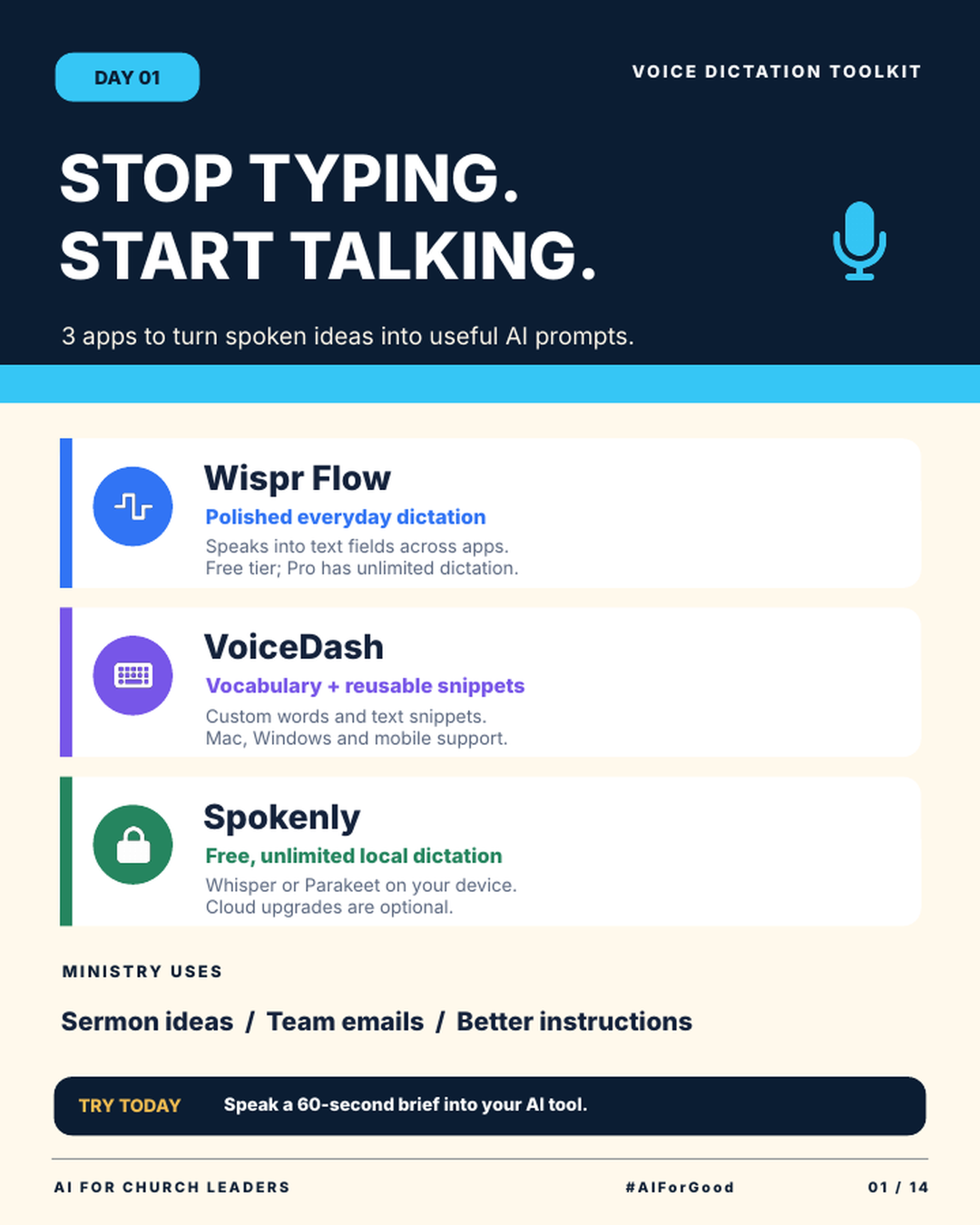
The infographic lists 3 ministry uses. Each one starts with you talking through a real task.
Sermon ideas. If you preach, talk through an early idea soon after you have it. Paste the text into your AI tool and ask it to sort your thoughts into an outline. The ideas and the final message stay yours.
Team emails. Say the 3 or 4 points you need to cover. Then ask AI to turn them into a short, clear email for your team. For more help, read how to write church emails and announcements with AI.
Better instructions. Speak the full background for any AI task. Say who it is for, what the goal is and what to leave out. A longer spoken prompt gives AI more to work with.
Keep private information out of every AI tool unless your church policy allows it. That includes pastoral care notes, health details and giving records. This post on the data privacy risk of staff AI use explains what to watch for.
Speaking your prompt lets you give AI more detail in less time. More detail gives you a better first draft.
Try this this week
The infographic gives you one challenge: speak a 60-second brief into your AI tool.
How to speak a 60-second AI prompt
- Install one of the 3 apps. Spokenly's local dictation is free. Wispr Flow and VoiceDash both have free plans.
- Pick one real task, such as a staff email or an event announcement.
- Open ChatGPT, Claude or the AI tool you already use, and click into the chat box.
- Start the dictation app and talk for 60 seconds. Say who the message is for, what you need and the facts it must include.
- Read the text before you send it, and fix any words the app got wrong.
Join AIforChurchLeaders.com to access the training library and courses that help you level up your AI skills and fluency for ministry.
Frequently asked questions
What is the best free dictation app for AI prompts?
Spokenly offers free local dictation with no usage limit and no account. Wispr Flow's free plan gives you 2,000 words a week on desktop. VoiceDash's free plan gives you 1,000 words a month on Mac and Windows. Try one for a week and keep the one you use most.
Can I use voice dictation with ChatGPT and Claude?
Yes. All 3 apps type your words into other apps, so you can speak into the chat box. Read the text before you press send.
Is voice dictation private?
It depends on the app. Spokenly's local models keep your voice on your device. VoiceDash says recordings and transcriptions "are not stored and are never used to train AI models." Keep confidential care details out of every AI tool.
How do I get dictation to spell staff names correctly?
VoiceDash Pro includes a personal dictionary for names and special words. With any app, read the text before you send it. Fix names by hand when the app gets them wrong.
Is talking really faster than typing?
A study by Stanford, the University of Washington and Baidu found that English speech input on a phone reached 153 words per minute. The keyboard reached 52 words per minute. That is about 3 times faster.