
First-Time Guest Follow-Up: A 3-Email Sequence You Can Draft With AI
Nov 25, 2026
A first-time guest came to your church on Sunday. They filled out a card or a form, so you have their email address. Your emails this week let that guest know someone at your church noticed them.
A short email sequence helps your team follow up the same way every week. An email sequence is a set of emails sent in a planned order over a few days.
AI can help you draft all 3 emails at once. You write the sequence once. Then your staff personalizes it for each guest every week.
What is a 3-email guest follow-up?
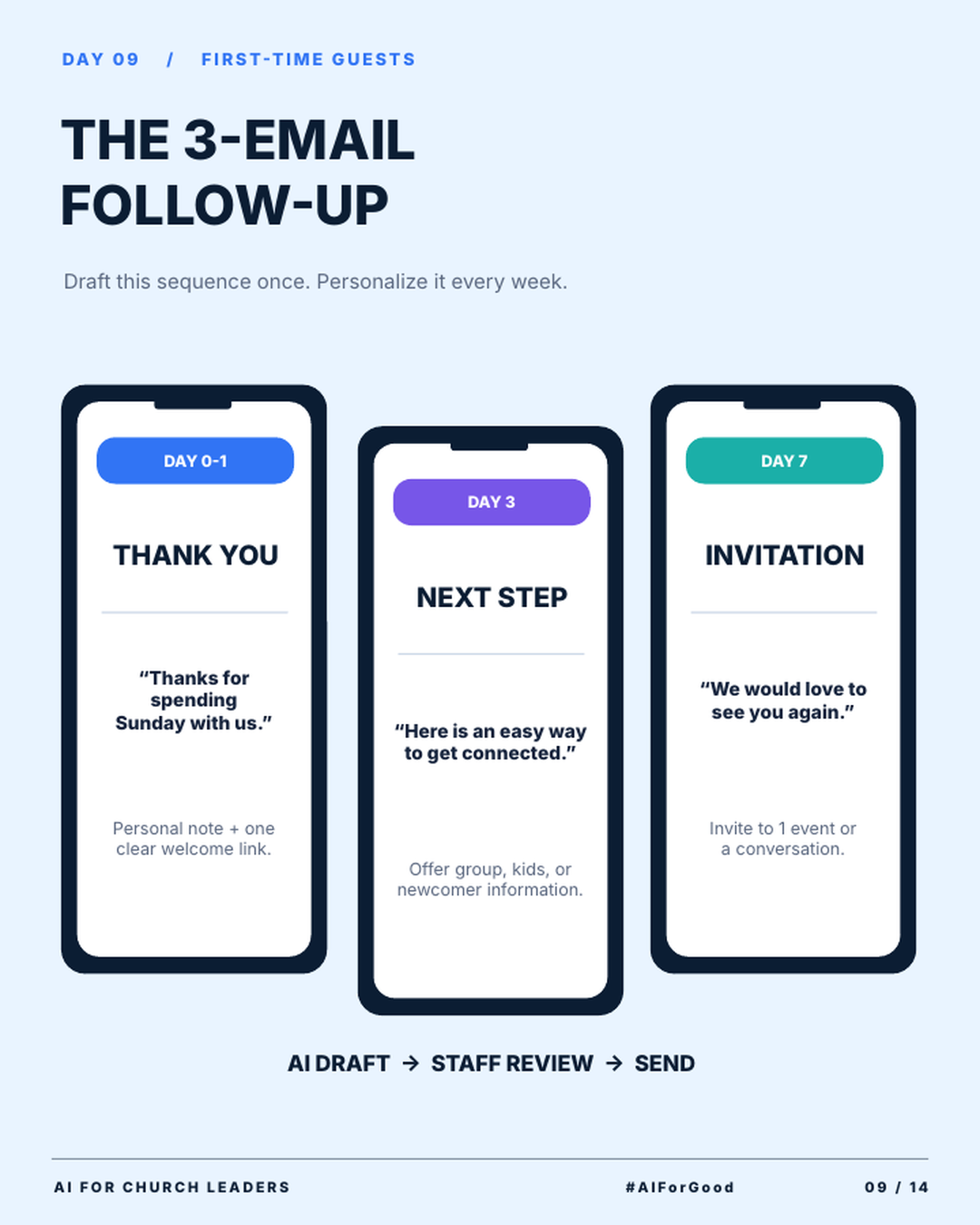
The plan covers the first 7 days after a visit. Each email has one job.
The Day 0-1 thank-you email. This email goes out the same day or the day after the visit. It opens with a line like "Thanks for spending Sunday with us." Add a short personal note and one clear link to your welcome page.
The Day 3 next-step email. This email says something like "Here is an easy way to get connected." Offer information on groups, kids ministry or newcomer events. Pick the option that fits your church right now.
The Day 7 invitation email. This email says "We would love to see you again." Invite the guest to one event or to a conversation. A conversation could be coffee with a pastor or a staff member.
How do you draft the sequence with AI?
You use an AI chat tool, such as ChatGPT, Claude or Gemini. You type a prompt, and the tool writes a draft. A prompt is the instruction you give the tool.
Here is a sample prompt you can copy. Fill in the brackets with your church's details.
Help me write a 3-email follow-up sequence for first-time guests at our church.

Church name: [Church Name]
Tone: warm and plain. Short sentences. No church jargon.
Welcome page link: [Link]
Next-step options: [small groups / kids ministry / newcomer lunch]
Day 7 invitation: [one event and its date, or coffee with a pastor]

Email 1 (send Day 0 or 1): Thank them for spending Sunday with us. Leave a spot for a short personal note. Include one welcome link.
Email 2 (send Day 3): Share one easy way to get connected.
Email 3 (send Day 7): Say we would love to see them again. Invite them to one event or a conversation.

Keep each email under 120 words. Use [First Name] as a placeholder. Write a subject line for each email.
Use placeholders like [First Name] in the prompt. That way you never paste a guest's real name or contact details into the AI tool. Our post on staff AI use and data privacy explains why this habit protects your people.
Who should review the emails before they go out?
The graphic shows the full path for every email: AI draft, staff review, send. Keep this review step every week, even after the templates feel finished.
A staff member checks the name, the links, the dates and the event details. Then they read each email out loud and rewrite anything that sounds stiff. The goal is an email that sounds like your church talking.
The personal note in the thank-you email has to come from a person. The AI tool has never met your guest. Someone who greeted them, or who read their card, should write that line.
Let AI write the first draft of all 3 emails once. Let a real person review and personalize every email before it goes out.
How do you reuse the sequence every week?
Save the 3 reviewed drafts as templates in the email tool your church already uses. A template is a saved email you can copy and edit.
Each week, open the templates and swap in the guest's name. Add the personal note. Update the Day 7 invitation if the event has changed.
If you want more help writing other church emails, read how to write church emails and announcements with AI.
Key terms to know
AI chat tool. An AI chat tool is an app where you type a request and get written text back. ChatGPT, Claude and Gemini are examples.
Prompt. A prompt is the instruction you type into an AI chat tool.
Email sequence. An email sequence is a set of emails sent in a planned order over several days.
Placeholder. A placeholder is a word in brackets, like [First Name], that you replace with real details later.
Try this this week
Set up your guest follow-up in 5 steps.
- Open the AI chat tool your church already allows staff to use.
- Paste the sample prompt and fill in the brackets.
- Edit the 3 drafts until they sound like your church.
- Save them as templates in your email tool.
- After next Sunday, have one staff member personalize the thank-you email and send it to each new guest.
Join AIforChurchLeaders.com to access the training library and courses that help you level up your AI skills and fluency for ministry.
Frequently asked questions
How soon should a church follow up with a first-time visitor?
In this plan, the first email goes out on Day 0 or Day 1. That means the same day as the visit or the day after. A quick thank you tells the guest your church noticed them.
Is it OK to use AI to write emails to church visitors?
Yes, as long as a person reviews every email before it goes out. AI writes the first draft. Your staff checks the facts and adds the personal note. Follow your church's AI policy if you have one.
Should I put a guest's personal information into ChatGPT?
Keep guest details out of the prompt. Use placeholders like [First Name] and fill them in later inside your own email tool. Check your church's policy before staff use any AI tool with member or guest data.
How many emails should I send to a first-time guest?
This plan uses 3 emails over 7 days. Each one has a single job: say thank you, offer a next step and invite the guest back. You can add more later if your team can keep up with them.
Can I schedule these emails ahead of time?
If your email tool can schedule messages, you can set up the timing once. Keep the staff review step for each guest. The personal note still needs a real person.