
How to Build a Church Board Report With AI: 4 Things Your Board Needs
Nov 29, 2026
Your board meets soon, and you need a report they can read in a few minutes. You have attendance numbers, giving reports, volunteer lists and a few decisions waiting for a vote.
Putting all of that on one clear page can take hours. AI can help you do it faster.
You give an AI tool the numbers your team has already approved. It sorts them into a short report and points out what the board needs to decide. This article covers the 4 sections your board needs and a prompt you can copy today.
What should a church board report include?
A good board report fits on one page. Board members should be able to scan it and find the decisions fast.
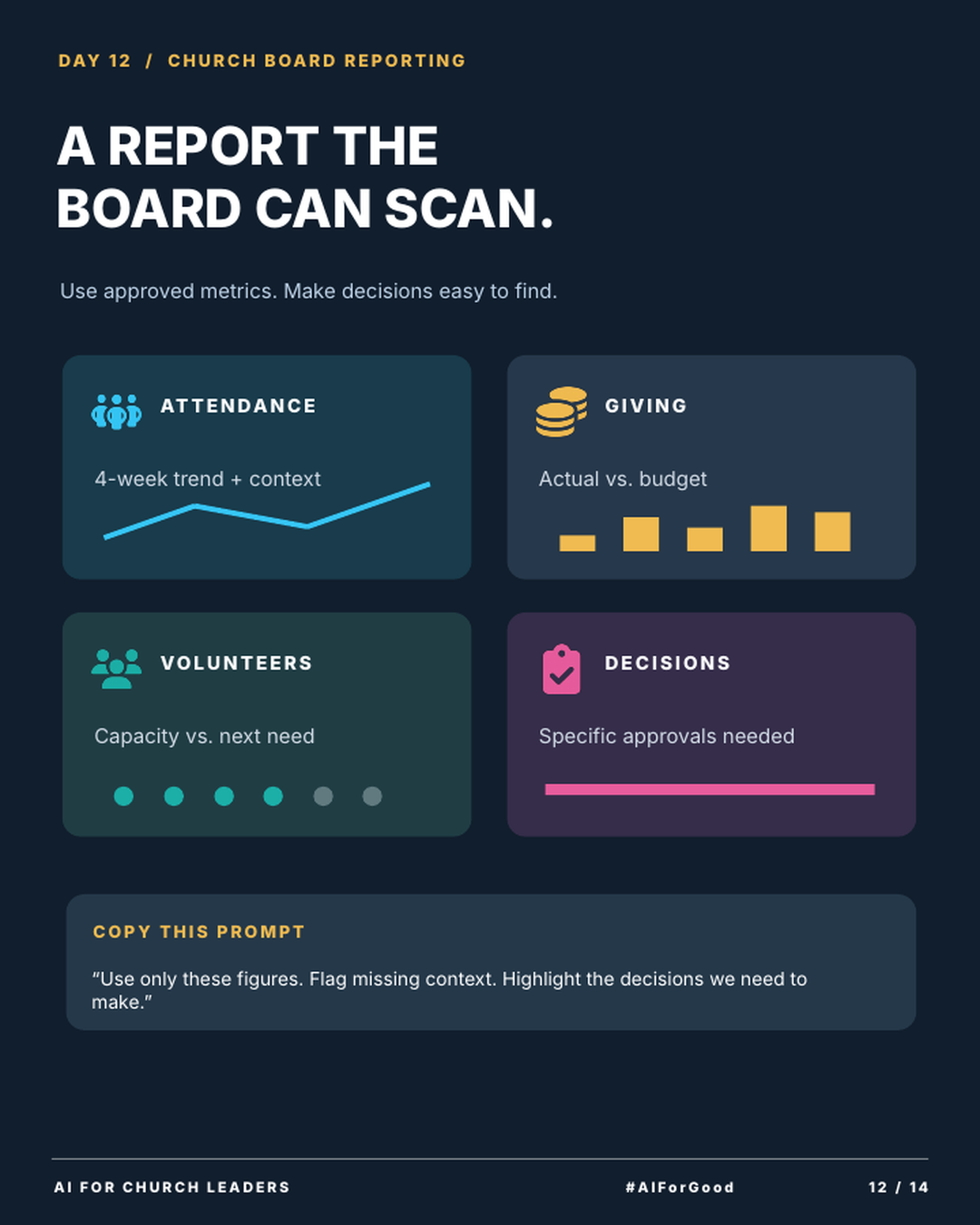
The infographic shows 4 sections. Each one answers a question your board already asks.
Attendance. Show the last 4 weeks as a trend line. Add a short note about context, such as a holiday weekend or a special event. A number with no explanation can worry a board for no reason.
Giving. Show actual giving compared with the budget. Use totals for the month or the quarter. The board wants to know if giving is on track with the plan.
Volunteers. Show how many volunteers you have today. Then show how many you need for what is coming next, like a new ministry or a busy season. This helps the board see staffing needs early.
Decisions. List the specific approvals you need from the board. Put them where no one can miss them. When the board knows exactly what it must decide, the meeting can focus on those items.
How do you use AI to draft the report?
Start with numbers your team has already checked and approved. Ask the people who track attendance, giving and volunteers for their latest totals.
Open an AI chat tool like ChatGPT or Claude. Paste in your approved totals and the list of decisions. Then add this prompt from the infographic:
“Use only these figures. Flag missing context. Highlight the decisions we need to make.”
Each sentence in the prompt does something specific.
“Use only these figures” tells the AI to stick to your numbers. AI tools sometimes make up a number that looks correct. This line lowers that risk.
“Flag missing context” asks the AI to point out numbers that need an explanation. For example, it might notice that attendance dropped one week and ask what happened.
“Highlight the decisions we need to make” puts the approvals in plain view. Your board will see them first.
When the draft comes back, read it line by line. Check every number against your source reports. Then add the context only your team knows, like why a number went up or down. You are responsible for what goes to the board, so treat the AI draft as a first pass.
What church data should you keep out of AI?
Do not paste confidential giving data about individuals into an AI tool. That includes names next to gift amounts and pledge records for specific people.
Your board report only needs totals. Give the AI the monthly giving total, the budget figure and the year-to-date total. Leave every donor name out of the chat.
Use the same care with volunteers. Share counts by team. Keep names and background check details out of the chat.
If your church has an AI policy, follow it. If you need help on this topic, read our post on staff AI use and data privacy.
Give AI only your approved totals, and ask it to point out the decisions. Your board gets a report it can scan in minutes.
Key terms to know
AI chat tool. An AI chat tool is an app like ChatGPT or Claude where you type a request and get a written answer back.
Prompt. A prompt is the instruction you type into an AI tool to tell it what you want.
Hallucination. A hallucination is when an AI tool states something false as if it were true, like a made-up number.
Context. Context is the background a reader needs to understand a number, such as a holiday or a special event.
Try this this week
Build a practice board report from last month’s numbers. Keep it private until you have checked it.
- Gather your approved totals for attendance, giving, budget and volunteers.
- Write down the decisions you need the board to make.
- Paste the totals and decisions into an AI chat tool with the prompt above.
- Check every number in the draft against your source reports.
- Share the draft with one staff member and ask what is unclear.
Join AIforChurchLeaders.com to access the training library and courses that help you level up your AI skills and fluency for ministry.
Frequently asked questions
Can AI write my church board report for me?
AI can draft the report from the figures you provide. It can organize the numbers and list the decisions. You still need to check every number and approve the final version.
Is it safe to put church giving data into ChatGPT?
Use totals only. Keep giving records tied to individual people out of any AI tool. Check your church’s AI policy before you share any financial information.
What should be on a one-page church board report?
Show attendance as a 4-week trend with context. Show actual giving compared with budget. Show volunteer capacity compared with the next need. Then list the specific approvals the board needs to make.
How do I stop AI from making up numbers in my report?
Tell it to use only the figures you give it. Ask it to flag anything that needs more context. Then check each number in the draft against your original reports.
Which AI tool should my church use for board reports?
A mainstream AI chat tool, such as ChatGPT or Claude, can draft this kind of report. Pick the one your church has approved for staff use. Our guide to which AI tools your staff can use can help you decide.