
How to Build a Volunteer Onboarding App Without Coding
Nov 15, 2026
You want new volunteers to feel ready for their first Sunday. Right now, the details they need might be spread across emails and shared files.
You can build a small app that puts it all in one place, and you do not need to write any code. In this article, an app means a simple website with a few pages your volunteers can use.
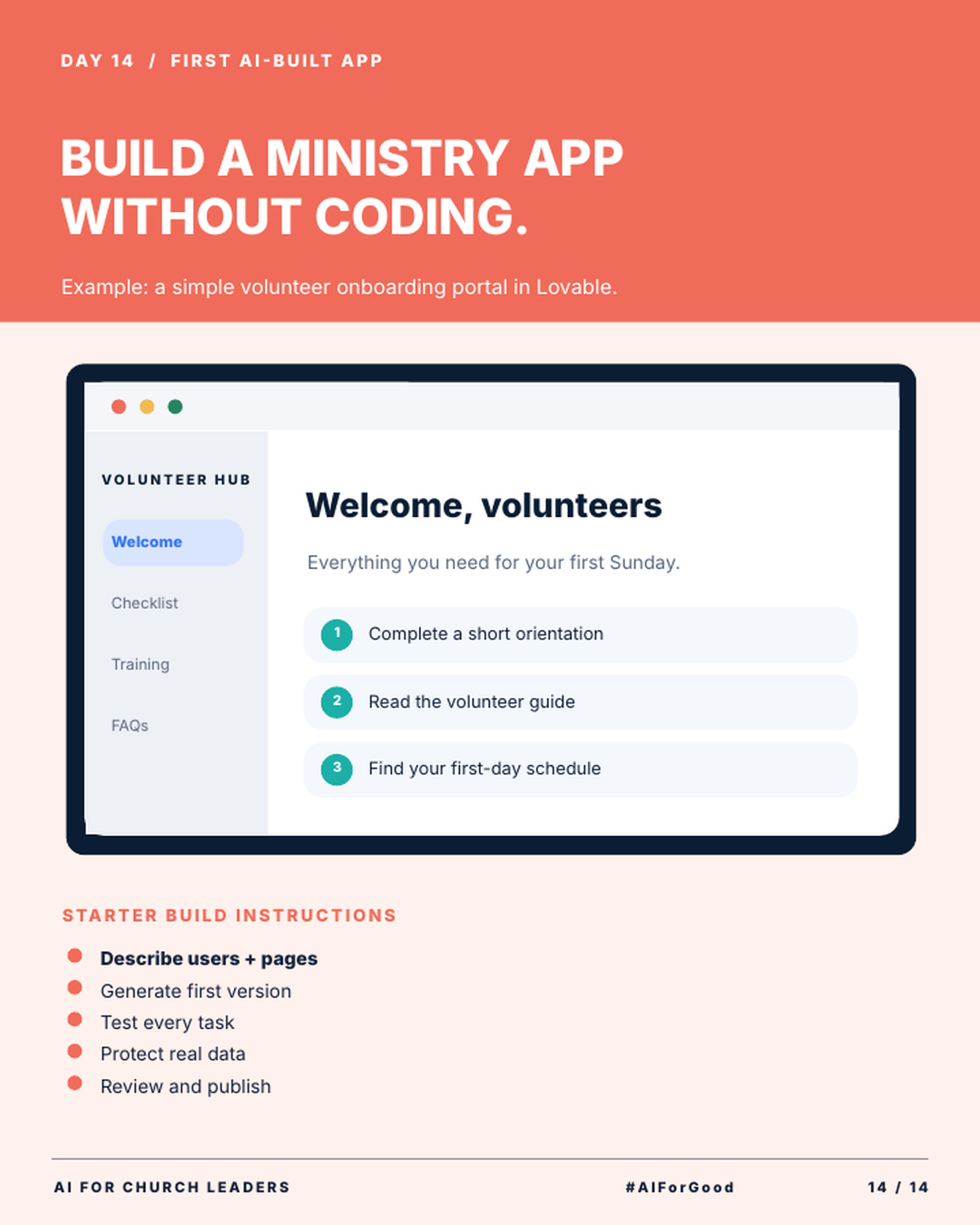
This article uses Lovable as the example tool. It walks through the 5 starter steps from the infographic.
What is vibe coding?
Vibe coding means building software by describing what you want in plain words. An AI tool writes the code for you. You look at the result and ask for changes until it works the way you want.
You can build this way without reading any code. Your job is to explain what you need and test what the AI builds.
What can Lovable build for a church?
Lovable is an AI app builder at lovable.dev. Its website says, “Describe what you want in plain language and Lovable builds it.”
Lovable says it builds full-stack apps, websites and internal tools. Full-stack means the app includes the pages people see and the parts behind the scenes that store information. Lovable says it also handles hosting, which means keeping your app online so people can reach it.
You can start free. Lovable’s plans page says the free plan includes 5 credits a day, up to 30 a month. A credit is the unit Lovable uses to measure your use.
The infographic shows a sample volunteer hub with 4 pages: Welcome, Checklist, Training and FAQs. The welcome page lists 3 first steps for a new volunteer: complete a short orientation, read the volunteer guide and find your first-day schedule.
How do you build a volunteer onboarding app in 5 steps?
These are the 5 starter build steps from the infographic.
Step 1: Describe users and pages. Tell Lovable who will use the app and what pages it needs. You can type: “Build a volunteer onboarding portal for new church volunteers. Include 4 pages: Welcome, Checklist, Training and FAQs. The welcome page should list 3 steps: complete a short orientation, read the volunteer guide and find your first-day schedule.”
Step 2: Generate the first version. Send your prompt and let Lovable build. The first version may be rough. Ask for changes in plain words, like “Make the checklist items something volunteers can check off” or “Use our church colors.”
Step 3: Test every task. Click through every page as if you were a new volunteer. Try every link and button. Ask one volunteer leader to try it and tell you where they got stuck.
Step 4: Protect real data. Use made-up names and sample details during the build. Decide what personal information the app needs before any real volunteer uses it. The next section covers this step in more detail.
Step 5: Review and publish. Have a staff member read every page for accuracy. Check what your Lovable plan includes for publishing. Then share the link with your new volunteers.
How do you protect real volunteer data?
Volunteer records are personal information. They can include phone numbers, email addresses and, for children’s ministry, background check results.
Build and test with sample data. Sample data is made-up information, so no real person’s details are at risk. Do not paste real volunteer lists into Lovable as you build.
Keep the first version simple. A welcome page, a checklist and training links may not need to store any personal data at all.
Before your app collects real information, decide with your team who can see the data and whether the app needs a login. Then check that your church policy allows this data in this tool.
If you are unsure, talk with the person who handles data privacy for your church before you go live.
Start with a simple app that shares information with new volunteers. Add features that store personal data only after you have a plan to protect it.
Key terms to know
Vibe coding. Vibe coding is building software by describing what you want in plain words. An AI tool writes the code.
App builder. An app builder is a tool that creates software from your instructions.
Prompt. A prompt is the instruction you type into an AI tool to tell it what you want.
Hosting. Hosting is the service that keeps your app online so people can open it.
Sample data. Sample data is made-up information you use for testing.
Try this this week
Build a first draft of your volunteer hub. Use sample data only.
- Sign up for a free Lovable account at lovable.dev.
- Paste the example prompt from step 1 above and add your church’s name.
- Click through the first version and write down 3 changes you want.
- Ask Lovable for those changes in plain words.
- Show the draft to one volunteer leader and ask for feedback.
Join AIforChurchLeaders.com to access the training library and courses that help you level up your AI skills and fluency for ministry.
Frequently asked questions
Can I build an app for my church without knowing how to code?
Yes. Tools like Lovable let you describe the app in plain words, and the AI writes the code. You still need to test it before anyone uses it.
Is Lovable free to use?
You can start free. The free plan includes 5 credits a day, up to 30 a month. Check Lovable’s plans page to see what each paid plan adds.
What is vibe coding in simple terms?
Vibe coding is building software by telling an AI what you want in plain words. The AI writes the code. You test the result and ask for changes.
Is it safe to put volunteer information in an AI-built app?
It depends on how the app stores and protects data. Build with sample data first. Before you add real information, decide who can see it and check your church’s AI and data policies.
What kind of ministry apps can I build with AI?
Start with simple tools, such as an onboarding portal, an event page or a staff checklist. Lovable says it builds full-stack apps, websites and internal tools. Add features once the basics work well.