
How to Build an AI Board of Advisors in Gemini Notebook for Big Church Decisions
Nov 14, 2026
You have a big decision in front of your church. It might be a building project or a new staff role. You want to think it through well before you bring it to your elders or board.
An AI board of advisors can help you prepare. You set it up in Gemini Notebook (formerly NotebookLM), a Google tool that answers questions based on the documents you give it.
You then look at your plan from 4 angles: operations, finance, governance and risk. Your leaders still make the final decision.
What is an AI board of advisors?
An AI board of advisors is a way to test a decision from several points of view. You ask an AI tool to review your plan the way 4 different advisors would.
Each advisor looks through one lens. A lens is a single point of view with its own main question.
The advisors help you spot questions and concerns early. Your elders or board make the decision.
How does Gemini Notebook help with church decisions?
Google renamed NotebookLM to Gemini Notebook on July 16, 2026. You upload your own sources and ask questions about them.
According to Google, you can upload PDFs, websites, YouTube videos, audio files, Google Docs or Google Slides. Gemini Notebook gives answers grounded in your sources, with in-line citations.
Grounded means the answer is based on the files you added. A citation is a small marker that shows which source an answer came from. For a church decision, you want answers based on your own budget and bylaws, and citations let you check each one.
How do you build your AI board of advisors in 5 steps?
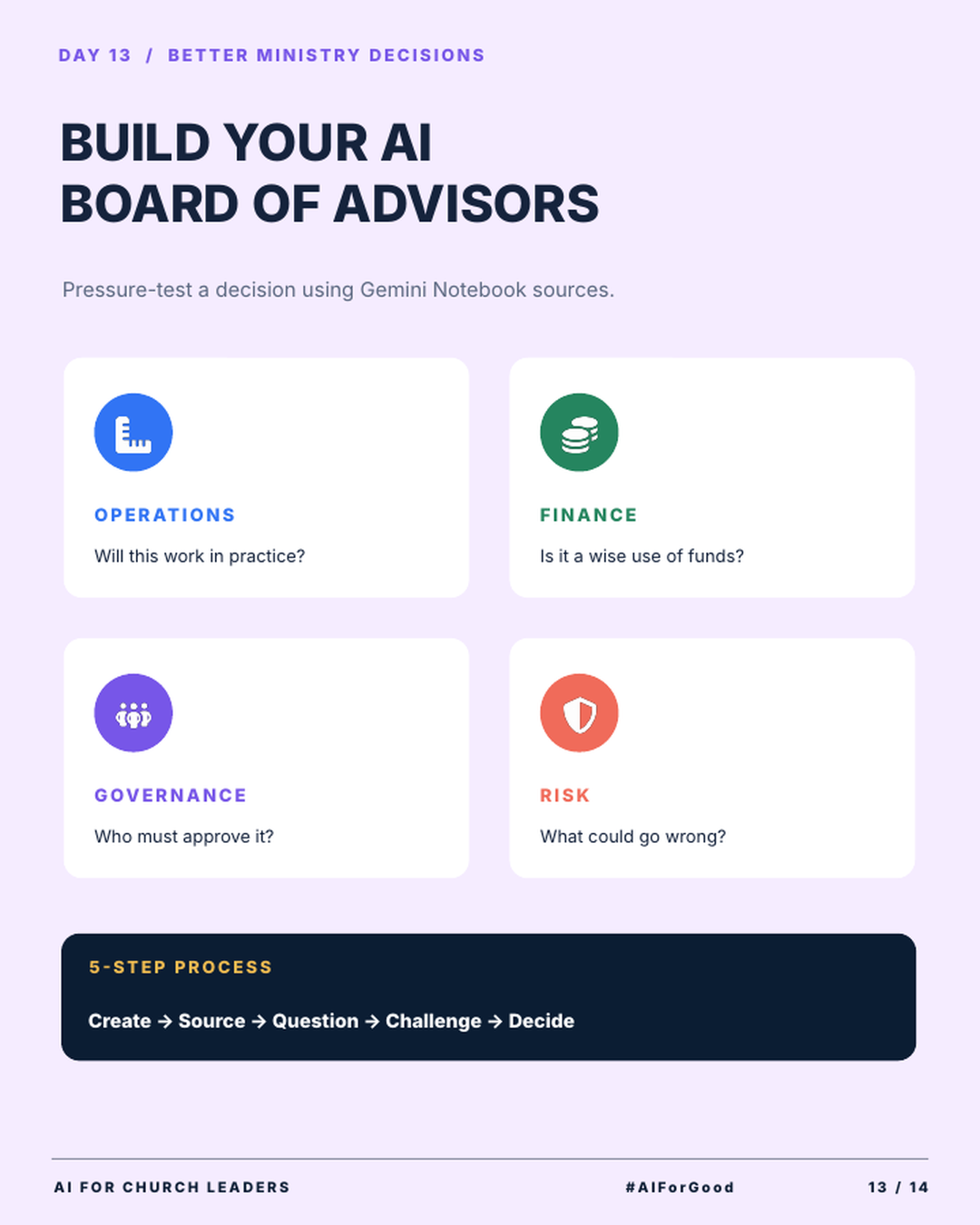
The infographic shows a 5-step process: Create, Source, Question, Challenge, Decide.
Step 1: Create. Create a new notebook for one decision. Give it a clear name, like “Second service plan.” Keep one decision per notebook so each notebook stays focused.
Step 2: Source. Add the documents that relate to the decision. These might include the proposal, your budget, your bylaws and meeting notes. Only add files your church allows you to share with an AI tool.
Step 3: Question. Ask the notebook to review the plan through each of the 4 lenses. Ask about one lens at a time. You can type: “Act as an operations advisor. Using only these sources, tell me if this plan will work in practice.”
Step 4: Challenge. Ask the notebook to argue against the plan. Ask which assumptions might be wrong and what your sources do not cover. Check the citations to see where each point came from.
Step 5: Decide. Bring what you learned to your leaders. Share the questions and concerns the notebook raised. Your leaders pray about what they learned and make the decision.
What questions should each advisor ask?
Use the 4 lenses from the infographic. Each one starts with a single question. Below each lens is a follow-up prompt you can paste into your notebook.
Operations: Will this work in practice? This advisor looks at people and schedules. Ask: “What would our staff and volunteers need to do each week to make this plan work?”
Finance: Is it a wise use of funds? This advisor looks at cost and budget. Ask: “Based on our budget, what will this cost in the first year, and what costs continue after that?”
Governance: Who must approve it? This advisor looks at your bylaws and decision process. Ask: “Based on our bylaws, which group has to approve this, and in what order?”
Risk: What could go wrong? This advisor looks for problems before they happen. Ask: “What are the biggest risks in this plan, and what could we do to reduce them?”
If an answer has no citation, treat it with care. Ask the notebook which source supports that point.
An AI board of advisors helps you ask better questions before a big decision. Your leaders still make the final decision.
Key terms to know
Gemini Notebook. Gemini Notebook (formerly NotebookLM) is a Google tool that answers questions based on the sources you upload.
Source. A source is a file or link you add to a notebook, such as a PDF, a Google Doc or a YouTube video.
Grounded answer. A grounded answer is based on your sources, so you can trace it back to a specific file.
Citation. A citation is a marker in the answer that shows which source the information came from.
Prompt. A prompt is the question or instruction you type into an AI tool.
Try this this week
Pick one decision your church will make in the next few months.
- Create a notebook in Gemini Notebook named for that decision.
- Add 3 to 5 sources, such as the proposal, the budget and the bylaws.
- Ask one question from each of the 4 lenses.
- Ask the notebook to give you the strongest case against the plan.
- Write a one-page summary of what you learned for your leadership team.
Join AIforChurchLeaders.com to access the training library and courses that help you level up your AI skills and fluency for ministry.
Frequently asked questions
What is Gemini Notebook?
Gemini Notebook is the new name for Google’s NotebookLM. You upload sources like PDFs, Google Docs or YouTube videos. It answers your questions with citations to those sources.
Is NotebookLM the same as Gemini Notebook?
Yes. Google renamed NotebookLM to Gemini Notebook on July 16, 2026.
Can AI make decisions for my church board?
No. AI can raise questions and point out risks. Your pastors, elders or board make the decision and own the result.
What documents should I upload to help with a church decision?
Upload documents tied to the decision, such as the proposal, the budget and your bylaws. Keep private details about individual members out unless your church policy allows them. Keep each notebook focused on one decision.
How do I get AI to argue against my plan?
Ask it directly. Try: “Using only these sources, give me the strongest case against this plan.” Then check the citation for each point it makes.