
How to Turn 1 Event Brief Into 9 Church Communication Assets With AI
Nov 27, 2026
Your church announces every event in a lot of places. The website, the email, the bulletin and the stage each need their own version. Writing each one by hand can take hours.
It is also easy for one version to end up with the wrong date or an old link. A guest who reads that version gets the wrong information.
You can fix both problems with one document. You write a short event brief with 8 approved facts. Then you ask AI to turn that brief into 9 formats your team can use.
What is an event brief?
An event brief is a short document that lists the facts about one event. "Approved" means a staff leader has checked the facts and signed off on them.
AI tools write best when they start from facts you trust. When a fact is missing, an AI tool may guess and fill in something that sounds right. A clear brief keeps every draft tied to the real details.
What 8 facts does the brief need?
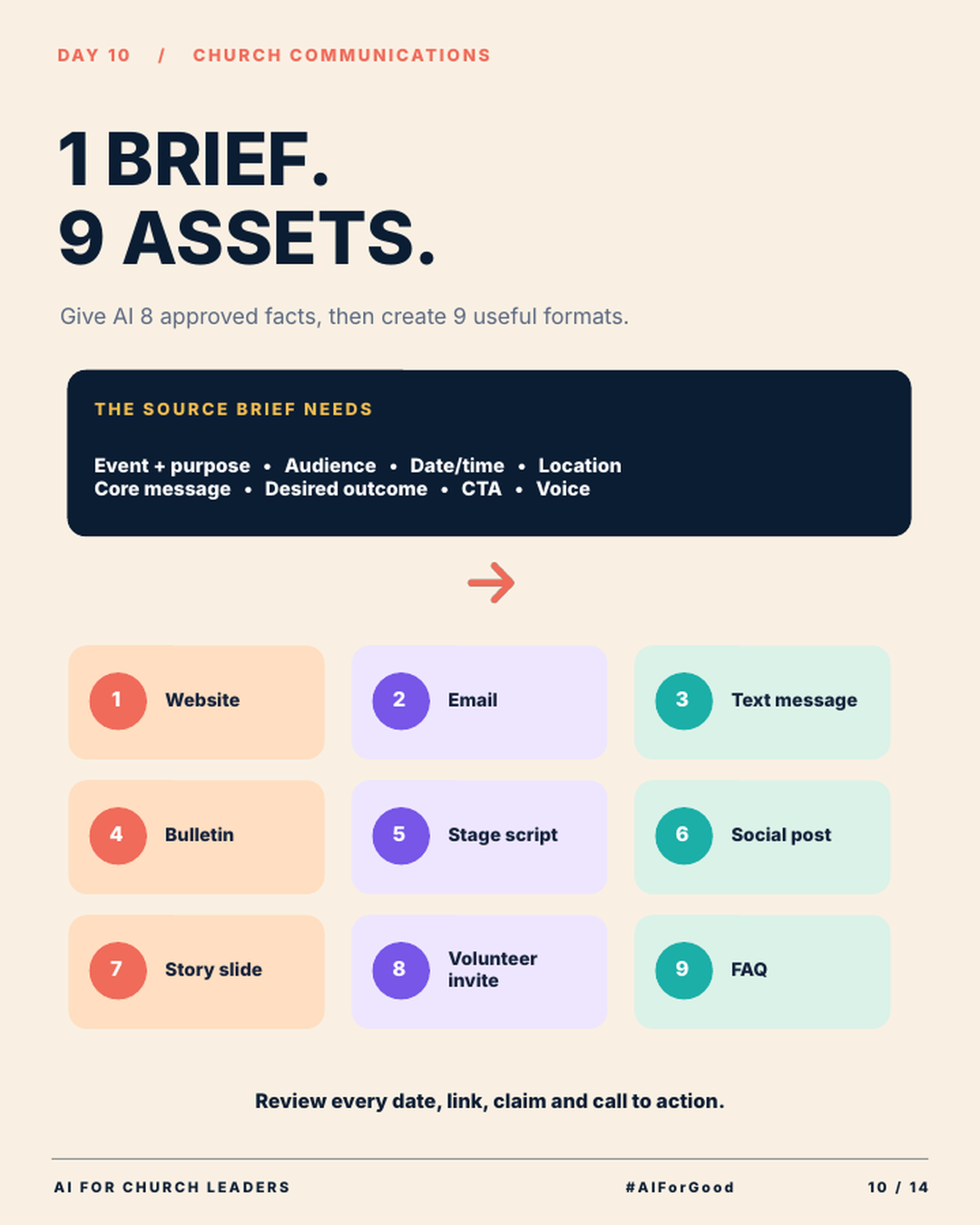
The graphic lists the 8 facts. Here is a template you can copy and fill in for your next event.
EVENT BRIEF

1. Event and purpose: [What is it, and why are we doing it?]
2. Audience: [Who is this for?]
3. Date and time: [Day, date, start and end time]
4. Location: [Room, building, address]
5. Core message: [The one sentence people should remember]
6. Desired outcome: [What we hope happens because of this event]
7. Call to action (CTA): [The one thing we want people to do, with the link]
8. Voice: [How we sound, for example warm and plain, no church jargon]

Approved by: [Name]
Date approved: [Date]
Keep each answer short. One or two sentences per fact is enough. The CTA should be one action, such as "Register at [link] by [date]."
What 9 assets can AI create from one brief?
An asset is one finished piece of communication. The graphic shows 9 of them.
The first row covers your website page, an email and a text message. These go to people who already know your church. Each one should point to the same CTA.
The second row covers the bulletin, a stage script and a social post. A stage script is the announcement someone reads aloud during the service. The social post goes on your church's social media pages.
The third row covers a story slide, a volunteer invite and an FAQ. A story slide is a short vertical graphic for Instagram or Facebook Stories. The FAQ answers common questions about the event, such as parking or childcare, using only facts from the brief.
How do you prompt AI to create the assets?
A prompt is the instruction you type into an AI chat tool, such as ChatGPT, Claude or Gemini. Paste your filled-in brief into the chat. Then add a prompt like this one.
Use only the facts in the event brief above.
If you need a fact that is not in the brief, write [NEEDS INFO].
Do not add any new details, prices or promises.

Create these 9 pieces:
1. Website event description
2. Email
3. Text message under 160 characters
4. Bulletin blurb
5. Stage script, about 30 seconds read aloud
6. Social post
7. Story slide text, 15 words or fewer
8. Volunteer invite
9. FAQ with 5 questions and answers

Use the voice described in the brief. Put the same CTA in every piece.
If the answer gets long, ask for 3 pieces at a time. You can find more help in our post on writing church emails and announcements with AI.
What should you review before anything goes out?
The graphic ends with one rule: review every date, link, claim and call to action. Do this for all 9 pieces before you publish.
Check that the date and time match the brief in every piece. Click every link to make sure it works. Read each claim and delete any detail the brief does not support.
Look hard at the FAQ. AI tools sometimes write answers about childcare, cost or parking that sound helpful. Keep only the answers your brief or your team can confirm.
One approved brief gives all 9 assets the same facts. Review every date, link, claim and call to action before anything goes out.
Key terms to know
Event brief. An event brief is a short document with the approved facts about one event.
Asset. An asset is one finished piece of communication, like an email, a bulletin blurb or a social post.
Call to action (CTA). A call to action is the one thing you want people to do next, such as register or sign up to serve.
Voice. Voice is how your church sounds in writing. It covers word choice, tone and sentence length.
Prompt. A prompt is the instruction you type into an AI chat tool. For more terms, see our AI ministry glossary.
Try this this week
Pick one event on your calendar for the next 6 weeks.
- Copy the brief template and fill in all 8 facts.
- Ask the event leader to approve the brief.
- Paste the brief and the sample prompt into the AI chat tool your church allows.
- Review every date, link, claim and call to action in all 9 drafts.
- Save the approved brief so you can reuse the format for the next event.
Join AIforChurchLeaders.com to access the training library and courses that help you level up your AI skills and fluency for ministry.
Frequently asked questions
Can AI write church announcements for me?
Yes. AI can draft announcements for your website, email, bulletin and stage. Give it an approved event brief first. Then have a staff member review every piece before it goes out.
What should I include in a church event brief?
Include 8 facts: event and purpose, audience, date and time, location, core message, desired outcome, call to action and voice. Have a leader approve the brief before you use it with AI.
How do I stop AI from making up event details?
Tell the AI tool to use only the facts in your brief. Ask it to write [NEEDS INFO] when a fact is missing. Then check every date, link and claim yourself.
Is it safe to put church event details into ChatGPT?
Public event details are the same facts you will post on your website. Keep private information out, such as names, phone numbers or member records. Follow your church's AI policy for which tools staff may use.
Do I have to create all 9 assets for every event?
No. Pick the formats your church uses for that event. A small gathering may only need an email, a text and a bulletin blurb. The brief stays the same no matter how many pieces you create.