
How to Write Better AI Prompts for Ministry: The F.A.S.T.E.R. Framework
Nov 21, 2026
When your prompt is vague, AI gives you a vague answer. You ask for "a welcome email" and get a generic note that could come from any church. Then you spend time rewriting it.
The F.A.S.T.E.R. framework helps you write a clear prompt the first time. Kenny Jahng created it. It has 6 parts, and each part gives AI one piece of information it needs.
Use it for any message your church sends, from guest emails to volunteer reminders.
Key terms to know
Prompt. A prompt is the request or instructions you give an AI tool.
Brief. A brief is a short set of instructions that explains a job before the work starts.
Framework. A framework is a simple structure you follow each time, so you remember every step.
Hallucination. A hallucination is when an AI tool states something false as if it were true.
For more AI words in plain language, read this glossary of 25 AI terms for church leaders.
What does each letter in F.A.S.T.E.R. stand for?
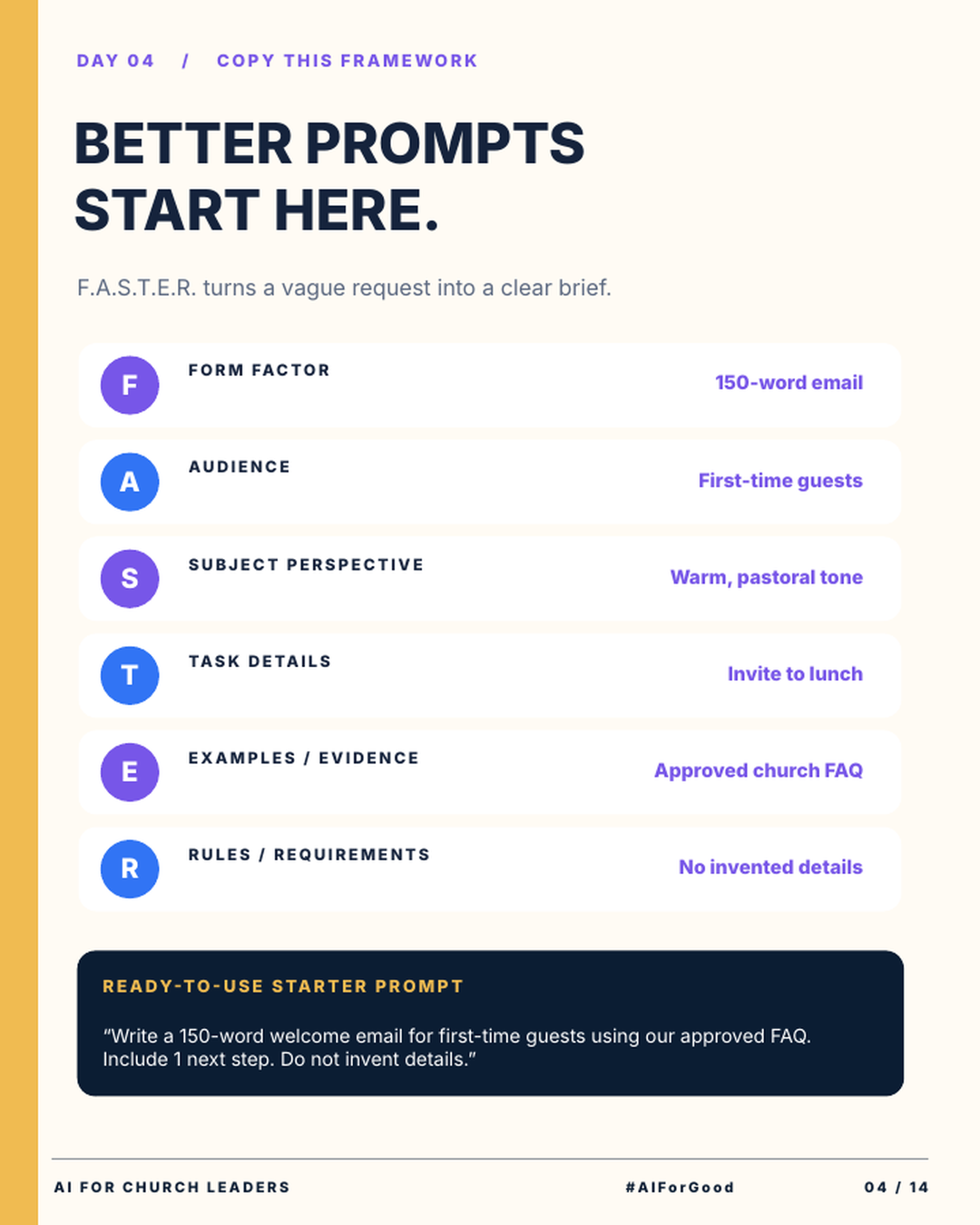
The infographic uses one example all the way through: a welcome email for first-time guests.
F: Form factor. Form factor is the shape and length of what you want back. The example is a 150-word email. A 5-point list or a short text message are other form factors.
A: Audience. Tell AI who will read it. The example is first-time guests. AI adjusts its words to fit the reader you name.
S: Subject perspective. Tell AI the voice and point of view to write from. The example is a warm, pastoral tone.
T: Task details. Tell AI exactly what the message needs to do. The example is an invitation to lunch. Add the date, time and place.
E: Examples and evidence. Give AI real material to work from. The example is your approved church FAQ. You can paste it into the chat or attach it as a file.
R: Rules and requirements. Set the limits. The example rule is "No invented details." You can also set rules on length, words to avoid or a required next step.
How does F.A.S.T.E.R. improve your AI answers?
When you leave a part out, AI has to guess. It might pick the wrong length or the wrong tone. Each letter answers one of those questions ahead of time.
The E and R parts protect accuracy. AI tools sometimes make up facts that sound true. When you give AI your approved FAQ and tell it to add no invented details, it has real facts to use.
You still need to check the result. Read every date, name and link before you send anything.
A clear prompt gives you a better first draft. F.A.S.T.E.R. gives you 6 questions to answer before you press enter.
What does a full F.A.S.T.E.R. prompt look like?
The infographic includes a ready-to-use starter prompt:
"Write a 150-word welcome email for first-time guests using our approved FAQ. Include one next step. Do not invent details."
Here is the same request with all 6 parts written out. Replace the parts in brackets with your own details.
"Write a 150-word email. It is for first-time guests who visited our church in the last week. Use a warm, pastoral tone. Invite them to a newcomer lunch on [date] at [time] in [place]. Use only the facts in our approved FAQ, pasted below. Do not invent details. If a fact is missing, write [CHECK WITH STAFF] in its place."
Paste your FAQ under the prompt and send it.
Any message you send more than once is a good fit for this framework. Try it for volunteer reminders, event announcements, small group emails and staff meeting agendas. For more on church messages, read how to write church emails and announcements with AI.
Try this this week
Rewrite one prompt you use often with all 6 parts.
How to rewrite a church prompt with F.A.S.T.E.R.
- Pick one message your church sends often, like a guest welcome or a volunteer reminder.
- Write one line for each letter: Form factor, Audience, Subject perspective, Task details, Examples and evidence, Rules and requirements.
- Paste in your approved source, such as your church FAQ.
- Run the prompt in ChatGPT, Claude or the AI tool you use, and check every fact in the draft.
- Save the prompt in a shared document so your staff can reuse it.
Join AIforChurchLeaders.com to access the training library and courses that help you level up your AI skills and fluency for ministry.
Frequently asked questions
What is the F.A.S.T.E.R. prompt framework?
F.A.S.T.E.R. is a prompt framework created by Kenny Jahng. The letters stand for Form factor, Audience, Subject perspective, Task details, Examples or evidence, and Rules or requirements. It turns a vague request into a clear brief for AI.
Does F.A.S.T.E.R. work with ChatGPT, Claude and Gemini?
Yes. A press release on AI Journal describes it as a 6-step method that helps leaders get what they need from tools such as ChatGPT, Gemini and Claude. You can use the 6 parts in any AI chat tool where you type or speak a prompt.
How long should an AI prompt be?
There is no set length. A good prompt answers all 6 F.A.S.T.E.R. questions. For most church tasks, that takes a few sentences plus any source material you paste in.
How do I keep AI from making up details in church emails?
Give AI your approved facts, like your church FAQ. Add a rule such as "Do not invent details." Then check every date, name and link yourself before you send, because AI can still make mistakes.
Can I reuse the same prompt every week?
Yes. Save your best prompts in a shared document. Each week, update the task details and paste in fresh facts.