
How to Make ChatGPT Sound Like Your Church (Start With One Page)
Oct 06, 2026
Your AI writing sounds generic because you keep giving it nothing to work with.
Type "write a welcome email for new visitors" into ChatGPT and you get a welcome email for a church. Any church. Warm, fine, forgettable.
The tool did exactly what you asked. It just does not know a single thing about you.
Most church staff respond to this by hunting for better prompts. Better prompts help. There is something you should do first, and it takes about 45 minutes one time.
Write a voice file.
What Is a Church Voice File?
A voice file is one page that tells AI who your church is, how you talk, and what you believe.
You write it once. Then you give it to the AI every time, either by pasting it in or by storing it somewhere the tool reads on its own.
Think about how you bring on a new communications volunteer. You do not hand them a task and walk away. You tell them the name of your church, what your people are like, which words you use, and which ones make your pastor wince.
A voice file is that same conversation, written down, for a tool that starts every session knowing nothing.
Why Does AI Writing Sound Generic?
AI answers by predicting the most likely words.
The most likely welcome email is the average of millions of welcome emails. Average is the default setting.
The more you tell it about your church, the less average it gets. That is the whole trick, and it has almost nothing to do with clever prompting.
What Goes in a Church Voice File?
Keep it to one page. Plain language. You are writing a cheat sheet, so skip the polish.
Church Voice File: The 7 Things To Include
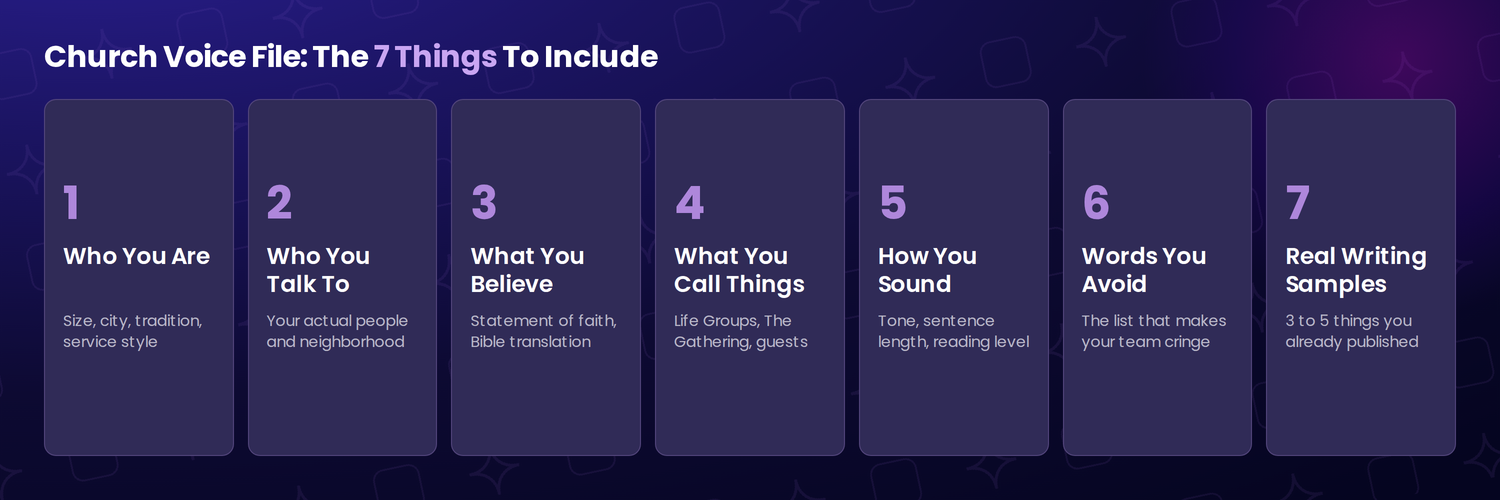 1. Who you are. Church name, city, size, tradition, service style. One paragraph is plenty. "We are a 350-person nondenominational church in a small town in central Ohio. One service, casual, mostly young families."
2. Who you are talking to. Describe your actual people. Ages, jobs, neighborhood, how long most of them have been around. "Most of our folks work at the hospital or the school district" changes an email more than any prompt trick will.
3. What you believe. Paste in your statement of faith, or a short summary of it. Name your Bible translation. If you preach ESV and AI keeps handing you NIV, your people will spot it.
4. What you call things. Life Groups or Small Groups or Community Groups, The Gathering or The Service, guests or visitors. Every church has its own words, and getting them wrong is the fastest way to sound like an outsider wrote your announcement.
5. How you sound. Short sentences or long ones, formal or casual, humor or none. Name your reading level too. Say it plainly: "We write at about a 7th grade level. No exclamation points. We never sound like a sales pitch."
6. Words you never use. Every church has a list, whether it is unchurched, seeker, or do life together. Whatever makes your team cringe, write it down so the AI stops using it.
7. Samples of your real writing. Paste in 3 to 5 things you actually published and liked. A newsletter, two announcements, a welcome email. This does more than every other item combined.
Where Do You Put the File?
This is the part people overthink. You have 3 options, and I would start with the easiest one.
Paste it at the top of the chat. Copy your voice file, paste it in, then ask for what you want. It works in every tool, it works today, and it costs nothing. The only downside is doing it again next time.
Put it in your settings. ChatGPT calls this Custom Instructions. Claude calls it Preferences. Gemini calls it Saved Info. Drop your voice file in there and it applies to everything you do.
Create a Project. ChatGPT and Claude both have Projects, and both include them on free accounts. Make one called "Church Communications," upload your voice file, and every chat inside that project reads it automatically. This is what I would set up for a staff team.
One warning before somebody sells you on a fancier option. If a consultant tells you to build a Custom GPT for your church, skip it. OpenAI is retiring Custom GPTs on December 11, 2026, and the change affects every ChatGPT plan.
That is exactly why I want you to own the file yourself. Features get retired on somebody else's schedule. Your one page still works in whatever tool you use next year.
How Do You Write It Without Starting From Scratch?
Do not stare at a blank page. Let the AI do the first draft about you.
Grab 5 things your church published that sounded right. A newsletter, a couple of announcements, a welcome email, a sermon recap.
Paste them in and ask this:
"Here are 5 pieces of writing from my church. Describe our voice. Tell me our reading level, sentence length, tone, and the words we use most. Then write a one-page style guide someone could follow to sound like us."
Read what comes back. Fix the parts that are wrong. Add your statement of faith, your Bible translation, and your never-use list.
You will be done in under an hour. If you want to sharpen how you ask for things after that, our friends at ChurchTechToday walk through the F.A.S.T.E.R. prompt framework and 5 other tips for pastors.
One caution while you gather samples. Pull from things you already published in public. Keep counseling notes, prayer request lists, giving records, and anything about a minor out of the file, since your samples get stored wherever you put them.
What a Voice File Will Not Fix
It will not check your theology. AI can sound exactly like your church and still be wrong about what your church believes. Somebody reads everything before it goes out.
It will not stop AI from making things up. It will invent a statistic, a testimony, or a Scripture reference and state it as fact. Look up the verse every single time.
It will not replace the judgment call about what belongs in front of your congregation at all. That is a governance question, and it is worth writing down alongside your voice file. We built AI Policies Made Simple for churches who want help with that part.
The Real Reason To Write This Page
Something happens when your team sits down to fill in those 7 items.
You have to answer who your church actually is.
Most teams cannot do it in one sitting. They argue about whether they are casual or reverent. 3 staff members describe the congregation 3 different ways, and nobody agrees on which Bible translation is the house standard.
Have the argument. You needed that answer long before AI showed up.
A church that can describe itself clearly in one page communicates better with everybody. Volunteers understand the assignment. New members know what they joined. The guy who walks in on Easter can tell what kind of place he is standing in.
Your AI output gets better. So does everything else you write.
Frequently Asked Questions
What if our church has more than one voice? Most do. Your student ministry does not sound like your bulletin. Write one core file with your church facts, beliefs, names, and never-use list. Then add a short block for each ministry, 3 or 4 lines on who that audience is and how that ministry sounds. You are adding to the core file every time, never replacing it.
We are a new church plant with almost nothing published. What do we use for samples? Use whatever exists. Your launch page, a few social posts, the email you sent your core team. If you truly have nothing, record your pastor talking for 10 minutes about why the church exists, run the transcript through AI, and use that as your sample. Spoken voice is usually closer to the real thing than anything a committee writes.
Will everything we publish start sounding the same? It can, if your file is nothing but rules. Rules flatten writing. Add a line telling the AI to vary sentence length and structure, and swap your writing samples every few months so it has fresh material to copy. When your announcements start reading like a form letter, your samples are stale.
How often should we update the voice file? Twice a year covers most churches. Update it sooner if you change service style, hire a new communications person, launch a campus, or notice the writing drifting. Put a review date at the top of the file so nobody has to guess how old it is.
Who on our team should own it? One person, usually your communications director or whoever writes the most. Owning it means keeping the master copy current and telling everybody when it changes. Without a clear owner you end up with 4 versions sitting in 4 different inboxes.
Does this work for the other languages our congregation speaks? Yes. Name the languages you publish in and list any words you keep in the original language. AI translation is fine for a first draft. A native speaker reads it before it goes out, especially anything theological.
Should we tell our congregation when AI helped write something? Answer that once as a leadership team, then apply it the same way every time. Most churches skip disclosure on routine items like event announcements and calendar reminders. Most should disclose on anything pastoral, personal, or signed by a specific person. Write the rule down before somebody asks you about it in the lobby, which is part of what AI Policies Made Simple walks churches through.
Open a blank doc and give your team 45 minutes this week. Can you describe your church in one page without an argument?
If the answer is no, that is the most useful thing you will learn all month. When you are ready to go further, every workshop and tutorial in the All-Access Membership is built for exactly this kind of practical work.