Hey friend!
Somewhere in the next three weeks you will explain your fall launch out loud for the 9th time.
You'll say it for the worship team, again in an elders meeting, again for whoever assembles the bulletin, then once more for the person running your Instagram, who asks a question you already answered in the elders meeting. Every retelling drifts a little. By the time it reaches the church-wide email, the small group deadline in the bulletin says one thing and the text blast says another, and the office starts fielding calls about which one is right.
The bottleneck here is your source information. It lives across 9 conversations and zero documents, so every asset gets rebuilt from memory, and memory drifts.
Today I'll show you how to fix that in one sitting, using a single document and a chained set of AI generations, so all 9 assets come out consistent and you stop explaining the launch from scratch.
Let's build it.
Write the launch brief before you open the AI tool.
The quality ceiling on anything a model writes for you is set by the specificity of what you gave it.
Type "write an email about our fall small group launch" and you get copy that any church in America could send, because generic input is all you provided. The model fills the gaps with the most statistically average church language available, which is exactly the sound your congregation scrolls past.
Feed it a brief instead and every sentence anchors to something true about your church. The tool is identical and so is the 30 seconds of generation. All of the difference comes from what you loaded in first.
The brief also solves the delegation problem. Write it once and store it somewhere your team can reach. In Claude you can load it into a Project's knowledge files alongside custom instructions, so it's present in every conversation inside that Project without anyone re-pasting it. A custom GPT does the equivalent. Now a staffer opens the workspace and the source material is already there.
Budget 20 minutes. This is the only part of the workflow that requires you specifically.
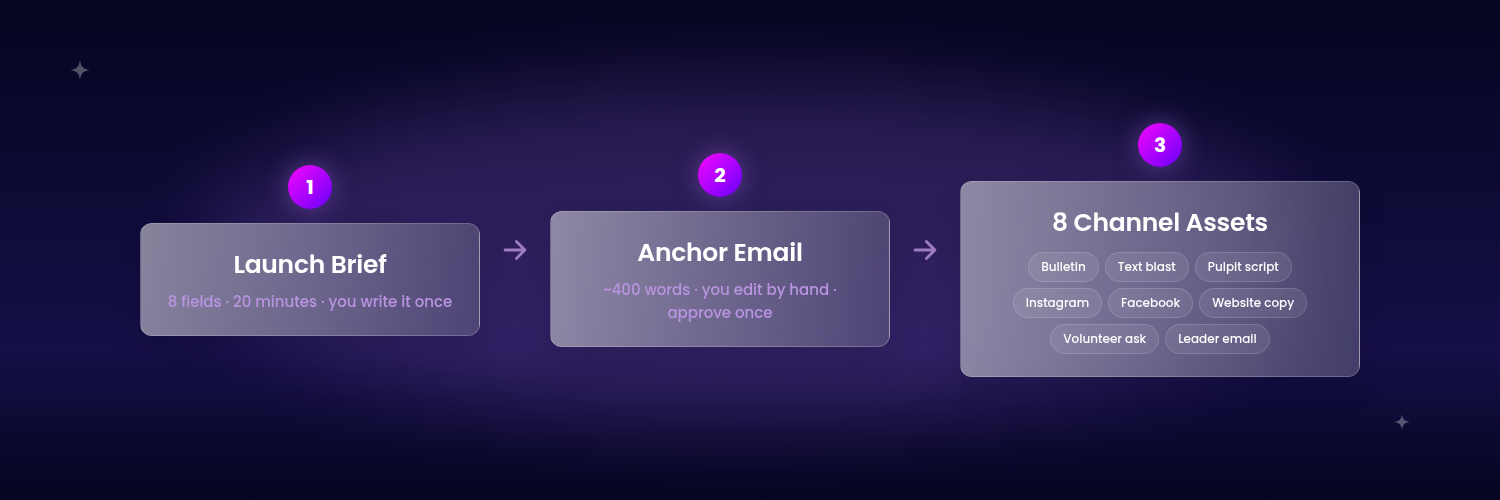
Your brief needs 8 fields, and stopping at 8 is the point.
Write it in plain text, one heading per field. Finished, it runs about 350 words on a single page.
- The one-sentence definition. What this is, phrased the way you'd say it to a visitor who has never attended anything.
- The specific audience. Name the actual segment. "Adults in their 20s who moved here within the last two years" produces different copy than "the church."
- The single action. One verb, one destination. If you want them to sign up, that is the only thing the assets ask for.
- Dates, times, and the deadline. Every date written with the day of the week attached. This is where drift does the most damage.
- The logistics that generate questions. Childcare, cost, parking, what to bring, what happens if someone misses week one.
- The real objection. The thing people think and do not say out loud. Usually some version of "I'll be the only new person there."
- The human. Name, role, and how to reach them.
- Voice constraints. Words you use, words you avoid, reading level, length limits.
Stopping at 8 matters because every field you add is a field the model weights. Drop your vision statement and a theology paragraph into a brief for a signup email and you get bloated copy that buries the deadline under language about journey and community.
Generate the anchor asset first, then cascade everything else from it.
Your anchor asset is the longest thing on your list. For most churches that's the congregation-wide email, somewhere around 400 words.
Write that one first, by itself. Run the generation, read it, edit it by hand until it's something you would send under your own name.
Open 9 separate chats and ask for 9 assets, and you get 9 separate acts of writing. Each one independently decides which detail leads and how hard to push the signup. One version opens with the date. Another buries it three paragraphs down. The text blast calls it "small groups" and the bulletin calls it "community groups." You've recreated the same drift you started this whole exercise to eliminate, only faster.
So you write one asset and compress it 8 times.
The bulletin blurb is the email at 60 words. The text blast is the email at 20 words. The pulpit announcement is the email spoken aloud in 30 seconds. The social caption is the email's strongest hook plus the single action. The volunteer recruitment ask is the email rewritten for a different audience with a different verb.
Compression carries forward every decision you already approved. Nothing downstream gets to reopen a question you settled.
Run the two-question QA pass before anything ships.
This workflow fails in two specific ways, and both are catchable in about 4 minutes.
Invented specifics. Models fill gaps with plausible detail. If your brief was silent on childcare, the email may state confidently that childcare is provided. The check: every proper noun, number, date, time, price, and URL in the draft has to trace back to a line in your brief. Anything that doesn't trace back is invented. Delete it, or go add it to the brief.
The model can run that audit on itself. Paste this into the same chat right after it hands you a draft:
Audit the draft you just wrote against the Launch Brief above.
List every proper noun, number, date, time, price, and URL that appears in the draft. Next to each one, put the exact line from the brief it came from. If it did not come from the brief, write UNSOURCED.
Then list the UNSOURCED items again on their own, as a delete-or-confirm decision for me.
Do not rewrite the draft. Output the audit only.
That prompt works on anything a model wrote for you, including copy from last year that you never checked.
Voice drift. Generated church copy gravitates toward a recognizable register: warm and slightly overwritten, heavy on "we'd love to have you." The check: read the anchor asset out loud. Any sentence you would not say standing in front of your own congregation gets cut.
Run both checks on the anchor asset before you cascade. Fixing the source fixes all 9 derivatives at once.
Hand the whole thing to one person and get out of the way.
The brief is your handoff document.
Once it exists, the generation and cascade steps require zero pastoral judgment. A competent volunteer or a part-time comms staffer can execute the rest without interrupting you.
Your remaining involvement: write the brief, approve the anchor asset. Call it 30 minutes.
This is also why it's worth doing in September specifically. You build the structure once for the fall launch, and the same 8 fields run your Christmas Eve services, your spring ministry launch, your baptism weekend, and your next capital campaign. Only the contents of the brief change.
That's the full system. Every piece of it is buildable from what you just read.
The part that eats the most time is the language itself. Prompts specific enough to return a sendable draft on the first generation take a couple of hours to write and test. The testing is the step that gets skipped, which is why most of the prompt libraries floating around church Facebook groups produce mush.
So here are mine. Start with the brief builder, because nothing else runs without it.
It does the interviewing for you. Paste in whatever you already have, however rough, and it comes back asking for precisely what's missing. It will not let you skip field 6.
Open a new chat and paste this:
Prompt 1: The Brief Interrogation
Paste everything below, then paste your messy notes underneath it.
You are an experienced church communications director. I'm going to give you unstructured notes about an upcoming church initiative. Your job is to turn them into a Launch Brief.
The Launch Brief has exactly 8 fields:
- One-sentence definition, phrased for a first-time visitor with no church background
- Specific audience segment, described demographically or situationally
- The single action we want taken, as one verb and one destination
- All dates, times, and deadlines, each written with day of week
- Logistics that generate questions: childcare, cost, parking, what to bring, what happens if someone misses the first week
- The real objection people have but do not say out loud
- The human contact: name, role, contact method
- Voice constraints: words we use, words we avoid, reading level, length limits
Read my notes. Then do this in order:
First, list every field you can fill confidently from my notes, and fill it.
Second, list every field you cannot fill, and ask me one direct question per gap. Ask them all at once, numbered. Do not guess. Do not fill a gap with a plausible assumption.
Third, once I answer, output the completed Launch Brief as clean plain text with the 8 fields as headings. Keep it under 400 words total.
Do not write any marketing copy yet. The brief is the only deliverable in this step.
Here are my notes:
On fields 6 and 8. These are the two you'd skip on your own, and they're the two doing the most work. Field 6 is what makes the copy persuasive, field 8 is what makes it sound like your church. The prompt will not move on without them.
What you run next
Run these in order. Each prompt eats the output of the one before it, so opening Prompt 3 early just builds 8 assets on top of a draft nobody approved.
Prompt 2, the Anchor Asset. Your completed brief goes in and a sendable congregation-wide email comes out, roughly 400 words, with the field 6 objection handled inside the copy and the deadline phrased so it survives compression. Same chat as Prompt 1. Then you stop and edit by hand.
Prompt 3, the Channel Cascade. This is the one that saves you the afternoon. It takes your approved email and compresses it into all 8 remaining assets in a single run, labeled and sized per channel, then closes with a consistency check that flags any date, name, or figure that drifted.
Prompt 4, the Voice Match. Run once, reuse forever. Feed it three things you wrote yourself and it hands back a voice profile you paste at the top of Prompts 2 and 3.
The one-page SOP. All 7 steps as a printable procedure, with per-step timings and an escalation rule covering the two situations that genuinely need you. This is the page you hand to a staffer.
The whole chain runs about 45 minutes.
Copy/paste Prompt 2 in the same chat you just used, the moment your brief comes back complete. Paste this: