Hey there!
Right now, somewhere in your building, a small group leader is staring at a blank document, trying to remember what your pastor actually said on Sunday.
Here's what usually goes wrong from there:
- The guide gets thrown together ten minutes before small groups start, so it feels like an afterthought instead of a continuation of Sunday.
- The questions default to "What did you think of the sermon?" which doesn't spark much of anything.
- Scripture gets paraphrased from memory instead of quoted accurately, and people notice.
- The same few people talk every week because there's no question built to draw out the ones who don't jump in first.
- The leader ends up worn out by Thursday, having spent an hour building something that gets used for twenty minutes.
Today I'm handing you the exact system to turn a Sunday sermon into a print-ready discussion guide in under 15 minutes, using one free tool and one AI prompt you build once and reuse every week.
Let's build it, step by step.
Step 1: Transcribe your sermon before you touch anything else.
Every discussion guide starts with an accurate transcript, and you don't need any special software to get one.
Go to riverside.fm/transcription. There's no account to create and no credit card to enter. You just drag your sermon file, audio or video, into the browser window and click start. It handles a full-length sermon without any trouble, and it supports over 100 languages if your church serves a multilingual congregation.
A couple minutes later, you'll have a full text transcript ready to copy. Skim it once before moving on. Automated transcription is remarkably good at capturing what was said, but it occasionally misspells a name or mishears a scripture reference, so a thirty second read-through saves you from feeding a mistake into the next step.
That transcript is now the raw material for everything else you're about to build.
Step 2: Know the five sections every strong discussion guide needs.
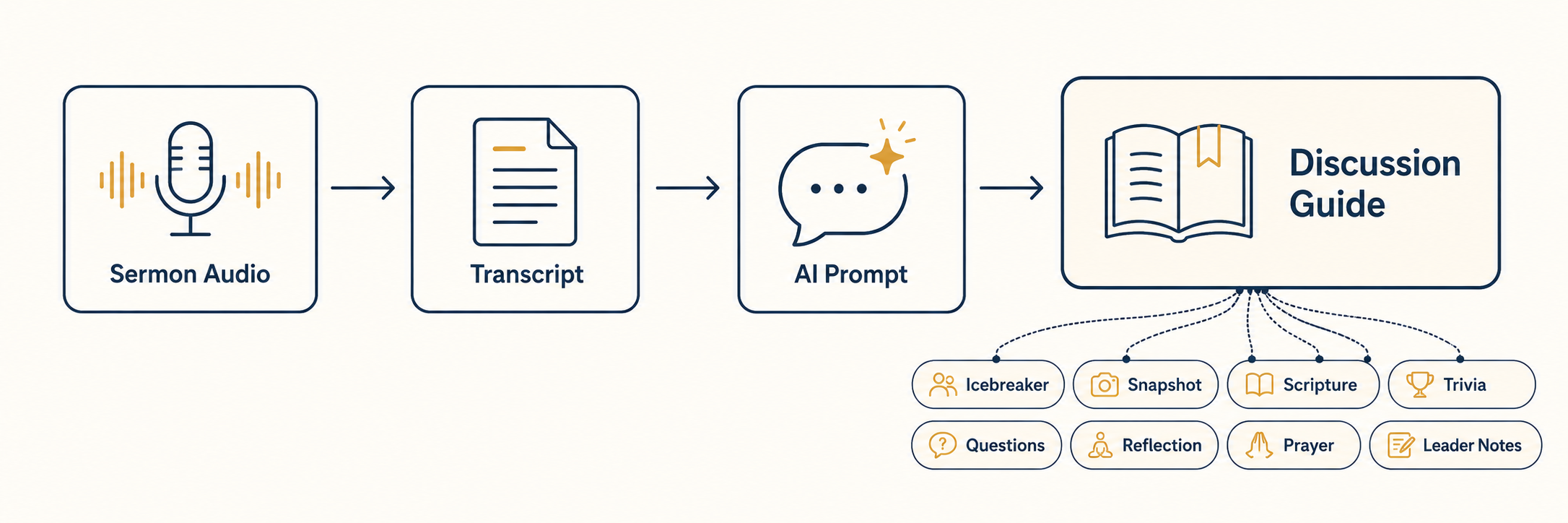
Before you write a single prompt, it helps to know what you're building toward. Here are the five sections that consistently make a discussion guide feel complete instead of thrown together:
- Sermon Snapshot: three to five sentences that remind the group what they heard, not a full recap of the message.
- Scripture Passages: the full text of every passage referenced, written out in one consistent translation and labeled clearly by book, chapter, and verse.
- Discussion Questions: five to seven open-ended questions that mix text exploration, everyday application, personal vulnerability, and at least one question that gently challenges an assumption.
- Personal Reflection Prompts: three invitations for people to sit with on their own during the week.
- Closing Prayer: four to six sentences someone can read aloud exactly as written, tied back to what was preached.
That's the foundation. A few more additions make the guide even stronger.
Step 3: Add three more sections that make people actually want to show up.
If you want people talking before you've even opened in prayer, and flipping open their own Bibles instead of just listening, these three are worth building in.
- Icebreaker Question: one low-pressure question, loosely tied to the week's theme, that gets everyone talking in the first two minutes. If the sermon was about waiting on God, something like "What's something you're really good at waiting for, and something you're terrible at waiting for?" works well. It's a simple way to get people talking, including the ones who don't usually jump in first, before the real questions start.
- Bible Trivia: one fun fact or quiz question about the book or passage referenced in the sermon, with the answer given right below it. Something like "True or false: the book of Ruth is only four chapters long. (True.)" It's a small, low-stakes way to build biblical literacy without turning your small group into a seminary class.
- Leader Notes: a short, private paragraph meant only for the group leader's eyes, never read aloud. Flag which question is likely to run long, which one might land differently depending on who's in the room, and one gentle way to redirect if the conversation drifts.
You can draft any of these by hand in under two minutes. If you'd rather have AI generate all eight sections automatically, straight from your transcript, that's exactly what's built into the prompt below.
Step 4: Turn all eight sections into one prompt you'll reuse every week.
Write one good prompt a single time, using a framework that keeps you from forgetting anything important, and you can reuse it every week from here on out.
I use FASTER: Form factor, Audience, Subject matter expertise, Task details, Examples or evidence, and Requirements and restrictions. Walk through each letter once, and you'll end up with a prompt detailed enough that the AI gets it right on the first try instead of something you have to rebuild from scratch.
A few things worth getting right when you write yours:
- Name the audience specifically. "Adults at varying stages of their faith journey, some longtime believers, some newer to church" tells the AI far more than "small group members" does.
- Give it a real example. One sample question, one sample prayer, shows the AI the tone you want better than three paragraphs of description would.
- Restrict the scripture translation. Without this, the AI mixes and matches translations inside the same guide, which reads as sloppy.
- Spell out what to leave out. No answer keys for the discussion questions, no invented passages, no seminary language.
- Give formatting rules for the newer sections too. Tell it the trivia answer belongs directly under the question, and that leader notes should never be written as something to read aloud.
Here's the exact prompt, ready to copy and paste.
This is the same prompt you can run every single week, built section by section with F.A.S.T.E.R. prompting sections, generating all eight parts (including the icebreaker, trivia, and leader notes) in one shot.
⤵️ ⤵️ ⤵️