Hey there!
Most first-time guests decide if your church is for them before they ever walk through your doors.
Here's what usually happens. Someone finds your church online, clicks over to your About page, and finds a paragraph of vision language next to a grid of staff photos. No one is talking to them. No one is looking back at them. It reads like every other church website they've scrolled past this year, and it does nothing to help them picture themselves walking in on a Sunday morning.
That matters more than most church leaders realize. Your About page is usually the second most visited page on a church website, right behind the homepage. The people who land there are trying to figure out if this is a place where someone like them actually fits, and a paragraph of mission language rarely answers that question for them.
So today, I want to show you the one page-level fix that will do more to help first-time guests picture themselves at your church this month than almost anything else on your site: a 20 to 30 second video, built around a simple one-liner, of your pastor or a staff member speaking straight into the camera.
Let's walk through why it works, and exactly how to build it.
Guests decide if they belong before they read a word of your mission.
The StoryBrand framework is built on a simple idea: a visitor connects with whoever seems to understand their exact situation. Somewhere on your staff, someone already knows how to talk about your church in plain, human terms. That person just isn't on your About page yet.
A visitor's brain does quick, mostly unconscious work the moment they land on your site.
Is this church for me?
Do they get what I'm going through?
Would I feel comfortable walking in alone?
Would this actually make a difference in my life?
A grid of staff photos and a paragraph about your mission don't answer any of that. A person, looking directly at the camera, speaking to them for 20 seconds, answers all four at once.
And it doesn't take much to build. One page, one person, and a script you can write in an afternoon.
A StoryBrand one-liner turns your mission into one memorable sentence.
Before you write a script, you need a one-liner. In StoryBrand terms, a one-liner has three parts. The character, the person you're trying to reach, has a problem. Your church, the guide, offers a plan to help. And there's a clear picture of what it looks like once they've found their place here.
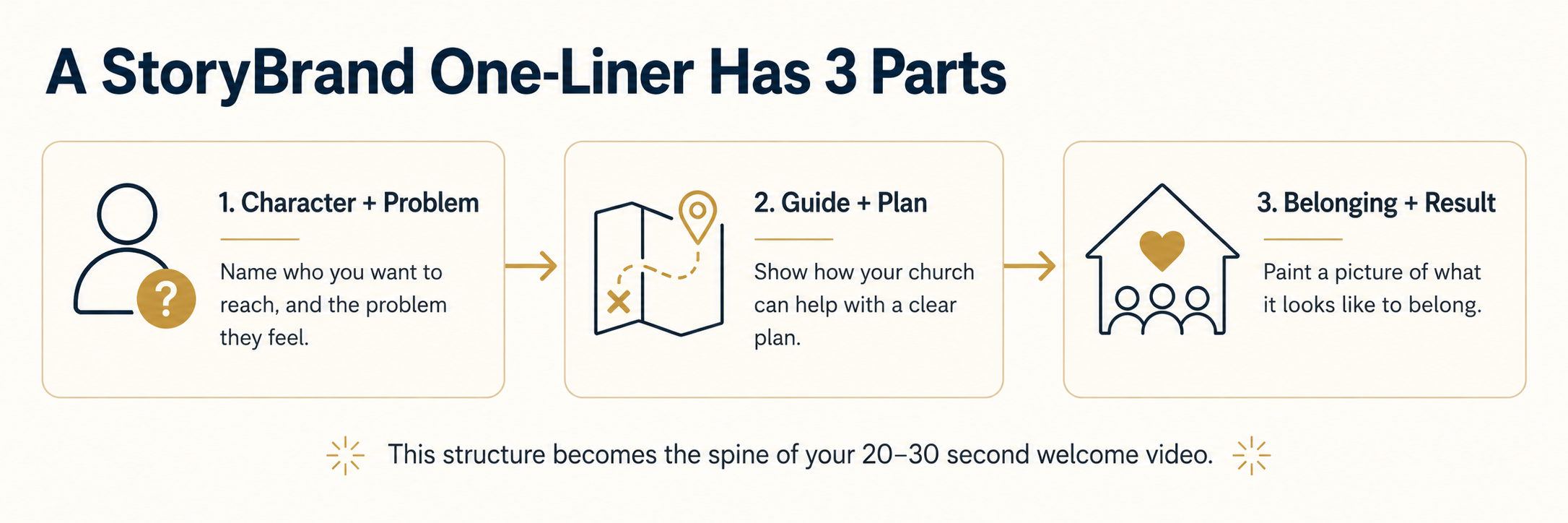
That structure becomes the spine of your video. The script opens by naming the real problem your visitor is facing, in language they would actually use. It introduces your church as the guide who walks with them. Then it paints a picture of what belonging actually looks like.
The video itself runs 20 to 30 seconds, has your pastor or a staff member speaking directly to camera, and closes with one clear next step for the viewer.
Here's how to build it in five steps.
You or someone on your team can have this filmed, written, and live on your website within a week.
- Draft your one-liner. Answer three questions: Who are you trying to reach, and what's the real problem they're facing right now, spiritually or in life? What does your church offer as the guide? What does it look like for them once they've found their place here?
- Choose your call to action. Decide what you want the viewer to do next: plan a visit, watch a message online, fill out a connect card, or join a group.
- Write the script. Follow the one-liner structure: name the problem, introduce your church as the guide, paint the picture of belonging, and close with the call to action. Keep the language conversational, the way you'd talk to one person sitting across from you.
- Keep the filming simple. A phone, natural light, and one person speaking directly into the lens is enough. Practice it a few times so the words come out naturally.
- Publish it above the fold on your About page, with captions added for anyone watching without sound.
If building this isn't something you're going to do personally, forward this to whoever manages your website. A comms director, volunteer, or media team member has everything they need here to move forward without asking you to explain any of it.
This is where handing the busywork to AI actually earns its keep. Below is the exact prompt you can copy and paste into Claude or ChatGPT. Answer a handful of questions, and it hands you back a draft that gets you most of the way there, often 90 percent or more. From there, you tighten it up, make it sound like your church, and go shoot the video.
Copy this prompt into Claude or ChatGPT and have your script in ten minutes.
Paste this into Claude or ChatGPT, then answer the questions as they come.